在methods中写入一个方法

clickcategory(index){ // 这里我们传入一个当前值
  this.categoryIndex = index
}

然后需要在data里面注册一下

data() {
   return {
    categoryIndex: 0, //点击当前背景变成白色索引
               }
  },

在css中设置我们当前选中项为active的类名,并给与一个白色的背景颜色

.active {
 background: #fff
}

接下来在html中绑定

<li @click="clickCategory(index)" :class="{active:categoryIndex==index}"> <!-- 选中当前动态绑定class -->
 
</li>

个人微信

MicroMessenger

企业微信

wxwork

QQ

MQQBrowser

钉钉

DingTalk

支付宝

AlipayClient

飞书

lark

可以使用小写
ua = navigator.userAgent.toLowerCase();

右键“我的电脑”(Windows 10上为“此电脑”),选择“管理”菜单项,打开计算机管理窗口。

  1. 左栏选择服务;
  2. 右栏中找到OpenSSH Authentication Agent服务;
  3. 双击打开设置界面,将启动类型由禁用改为自动;
  4. 点击应用,这时才可以手动启动和停止agent服务;
  5. 点击启动按钮,启动agent服务。

背景:

百度搜索 网易企业邮箱 会出现m.qiye.163.com 排名在前的问题

解决办法

  1. 在pc和m站分别加入 、mobile
    applicable-device标注可以帮助百度识别网站是PC站还是M站,给百度提交提交校验识别结果的正确性,减少百度蜘蛛把PC站当成M站,或者把M站当成PC站进行抓取。

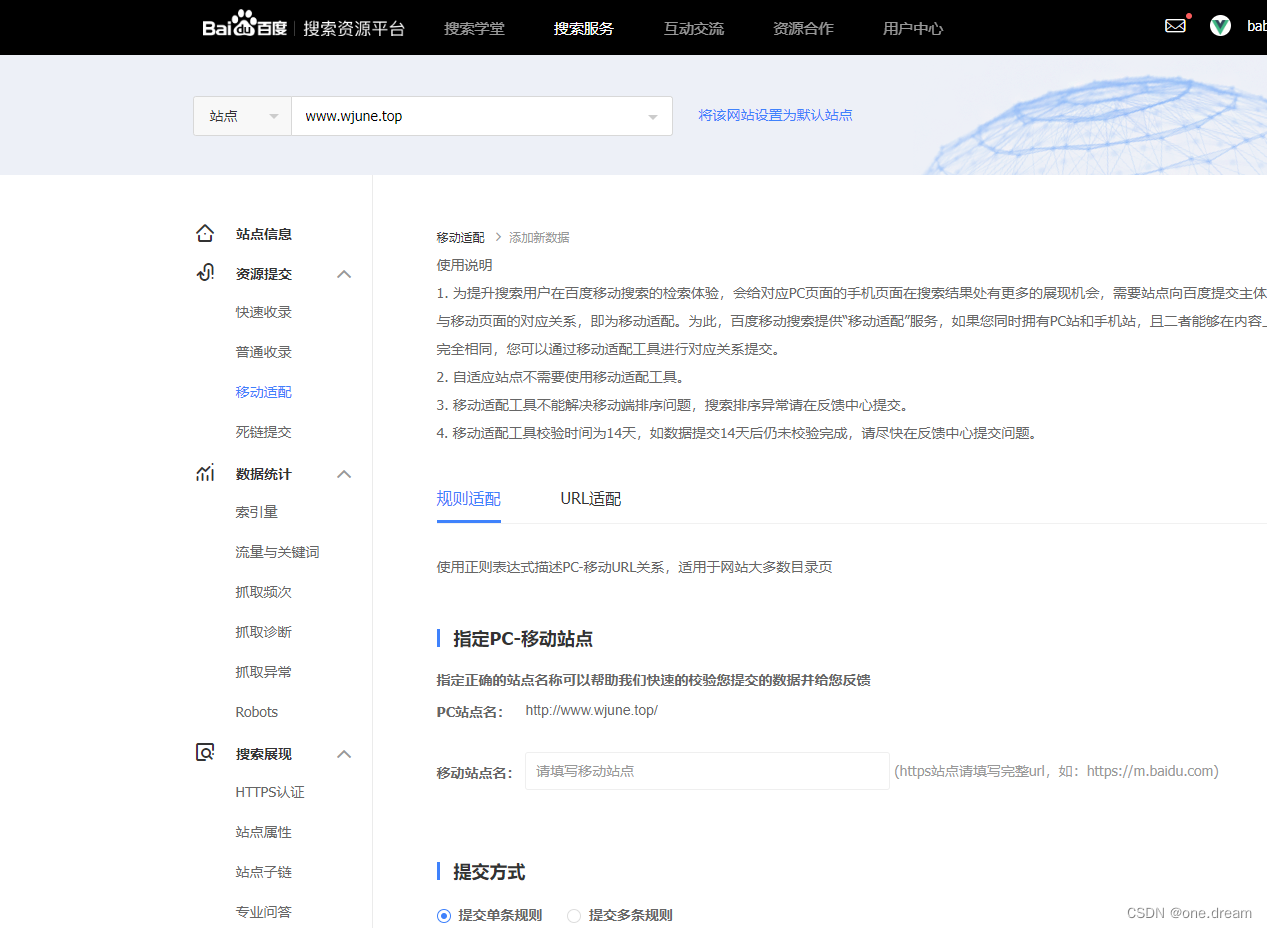
  2. 在百度站长平台做移动适配 在这里插入图片描述

  3. js代码在pc和m站分别判断ua,跳转正确网页

if(is_pc){
    window.location.href = 'https://qiye.163.com' + window.location.search;
}

推测出现此问题的原因是 我们只在pc站做了3的跳转逻辑 有可能被百度知道了
所以导致pc搜关键词直接出移动站

递归

let arr = [
    {id: 1, name: '部门1', pid: 0},
    {id: 2, name: '部门2', pid: 1},
    {id: 3, name: '部门3', pid: 1},
    {id: 4, name: '部门4', pid: 3},
    {id: 5, name: '部门5', pid: 4},
]
/**
 * 递归查找,获取children
 */
const getChildren = (data, result, pid) => {
  for (const item of data) {
    if (item.pid === pid) {
      const newItem = {...item, children: []};
      result.push(newItem);
      getChildren(data, newItem.children, item.id);
    }
  }
}

/**
* 转换方法
*/
const arrayToTree = (data, pid) => {
  const result = [];
  getChildren(data, result, pid)
  return result;
}

arrayToTree (arr,0)

map

<script>
let arr = [
    {id: 1, name: '部门1', pid: 0},
    {id: 2, name: '部门2', pid: 1},
    {id: 3, name: '部门3', pid: 1},
    {id: 4, name: '部门4', pid: 3},
    {id: 5, name: '部门5', pid: 4},
]
function arrayToTree(items) {
    const result = [];   // 存放结果集
    const itemMap = {};  // 
    // 先转成map存储
    for (const item of items) {
      itemMap[item.id] = {...item, children: []}
    }
    for (const item of items) {
      if (item.pid === 0) {
        result.push(itemMap[item.id]);
      } else {
        itemMap[item.pid].children.push(itemMap[item.id])
        console.log(item.pid)
      }
  
    }
    return result;
  }

  console.log(JSON.stringify(arrayToTree(arr)))
</script>

最优

function arrayToTree(items) {
  const result = [];   // 存放结果集
  const itemMap = {};  // 
  for (const item of items) {
    const id = item.id;
    const pid = item.pid;

    if (!itemMap[id]) {
      itemMap[id] = {
        children: [],
      }
    }

    itemMap[id] = {
      ...item,
      children: itemMap[id]['children']
    }

    const treeItem =  itemMap[id];

    if (pid === 0) {
      result.push(treeItem);
    } else {
      if (!itemMap[pid]) {
        itemMap[pid] = {
          children: [],
        }
      }
      itemMap[pid].children.push(treeItem)
    }

  }
  return result;
}
  • url-loader 将图片转化为base64 (url-loader包含file-loader)
  • file-loader 将url-loader不能转化的copy出来
  • css-loader 解析js中 import的css文件
  • style-loader 将css-loader解析的css生成style标签
  • html-loader 检测html文件中的标签如 img ,再使用url-loader处理 保证路径正确
  • mini-css-extract-plugin 将css-loader生成的css 放入单独的css文件 再结合html-webpack-plugin 通过link方式引入样式
  • html-webpack-plugin 创建一个html 文件,并把webpack 打包后的静态文件自动插入到这个html 文件当中

网上搜到的办法都是删除node_modules
但是并没有用
原来是正则表达式的问题
用 new RegExp 的方式去创建即可

reg=/(?<=(sem\/p|sem\/m)).*?(?=\.)/g

改为

reg=new RegExp("/(?<=(sem\/p|sem\/m)).*?(?=\\.)/g")

注意.前面加了个\

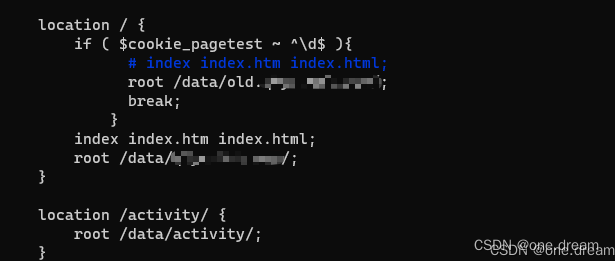
前端随机生成0-99的cookie,通过nginx分配10%的流量
nginx配置
在这里插入图片描述

前端生成cookie

  (function(){
                function random(min, max) {
                     return Math.floor(Math.random() * (max - min)) + min;
                     }
                function setCookie(name, value, days) { // 设置cookie days设置过期时间 单位:天 不传默认是 cookie 在浏览器关闭时删除
                    var exp = new Date();
                    days = days || 30;
                    exp.setTime(exp.getTime() + days * 24 * 60 * 60 * 1000);
                    document.cookie = name + "=" + escape(value) + ";expires=" + exp.toGMTString() + ';path=/';
                }
                function getCookie(name) { // 获取一个cookie  
                    var strCookie = document.cookie;
                    var arr = strCookie.split(';');
                    for (var i = 0; i < arr.length; i++) {
                        var t = arr[i].split("=");
                        if (t[0].trim() == name) {
                            return t[1];
                        }
                    };
                    return null;
                }
                if(!getCookie('pagetest')){
                    // alert(1)
                    setCookie('pagetest',random(0,99))
                    location.reload();
                }
            })()
0%