<!DOCTYPE html>
<html lang="en">
<head>
    <meta charset="UTF-8">
    <meta http-equiv="X-UA-Compatible" content="IE=edge">
    <meta name="viewport" content="width=device-width, initial-scale=1.0">
    <title>Document</title>
    <style>
        #wrap{
            width: 500px;
            height: 10px;
            background-color: red;
            position: relative;
        }
        .bar_container{
            width: 100%;
            height: 100%;
            background-color: aqua;
        }
        .bar_into{
            height: 100%;
            background-color: black;
            /* width: 100px; */
            width: 0;
        }
        .bar_drag{
            width: 10px;
            height: 10px;
            background-color: blue;
            position: absolute;
            cursor: default;
           top: 0;left: 0;
        }
        .bar_text{
            color: black;
            margin-top: 50px;
        }
        .xxx{
            /* background-color: red; */
            width: 100%;
            display: flex;
            justify-content: space-between;
            cursor: default;
        }
    </style>
</head>
<body>
    <div class="bar_wrap" id="wrap"><!--外包裹元素-->
        <div class="bar_container"><!--滑动条-->
          <div class="bar_into"></div><!--滑动痕迹-->
        </div>
        <div class="bar_drag"><!--滑块-->
          <div class="bar_text"></div><!--文本-->
        </div>
        <div class="xxx">
            <span>0</span>
            <span>100</span>
            <span>200</span>
            <span>300</span>
            <span>400</span>
            <span>500</span>
          </div>
      </div>
     
</body>
<script>    
//获取外包裹元素
var eBarWrap = document.getElementById('wrap');
  //获取滑动条
  var eBarCon = eBarWrap.getElementsByClassName('bar_container')[0];
  //获取滑动痕迹元素
  var eBarInto = eBarWrap.getElementsByClassName('bar_into')[0];
  //获取滑块
  var eBarDrag = eBarWrap.getElementsByClassName('bar_drag')[0];
  //获取文本元素
  var eBarText = eBarWrap.getElementsByClassName('bar_text')[0];
  eBarText.innerHTML = 0;
  var nMax = eBarCon.offsetWidth - eBarDrag.offsetWidth;
  //滑块添加拖拽事件
  eBarDrag.addEventListener('mousedown',function(event){
    //初始化鼠标开始拖拽的点击位置
    var nInitX = event.clientX;
    //初始化滑块位置
    var nInitLeft = this.offsetLeft;
    //页面绑定鼠标移动事件
    document.onmousemove = event=>{
      //鼠标移动时取消默认行为,避免选中其他元素或文字
      event.preventDefault();
      //获取鼠标移动后滑块应该移动到的位置
      let nX = event.clientX - nInitX + nInitLeft;
      //限制滑块最大移动位置
      if(nX>=nMax){
        nX = nMax;
      }
      //限制滑块最小移动位置
      if(nX<=0){
        nX = 0;
      }
      //修改滑块位置(因为用的是箭头函数,所以this还是指向滑块)
      this.style.left = nX + 'px';
      //修改滑动痕迹宽度
      console.log('nx---',nX)
      eBarInto.style.width = nX + this.offsetWidth/2 + 'px';
      //修改文本数值
      eBarText.innerHTML = Math.ceil(nX/nMax*100)/0.2;
    };
     //鼠标松开绑定事件,取消页面上所有事件
     document.onmouseup = function(event){
      document.onmousemove = null;
      document.onmouseup = null;
      
    }
  });
  //滑动条添加点击事件
  eBarCon.addEventListener('click',function(event){
    //设置滑动条位置
    var nLeft = this.offsetLeft;
    //获取有定位的父元素
    var eParent = this.offsetParent;
    //循环所有有定位的父元素
    while(eParent){
      //添加定位父元素offsetLeft值,用于准确定位滑动条与页面左侧的距离 
      nLeft += eParent.offsetLeft;
      //再次获取父元素外的定位父元素
      eParent = eParent.offsetParent;
    }
    //计算滑块位置
    var nX = event.clientX - nLeft;
    //修改滑块位置
    eBarDrag.style.left = nX +'px';
    //修改滑动痕迹宽度
    eBarInto.style.width = nX + eBarDrag.offsetWidth/2 + 'px';
    //修改文本数值
    eBarText.innerHTML = Math.ceil(nX/nMax*100)/10
  });
</script>
</html>

预览

链接

实现方案

  • ui将动画拆成n张图拼在一起
  • 使用background-position属性控制变化
  • animation属性 steps(n) 将动画拆成n关键帧

上代码

<!DOCTYPE html>
<html lang="en">
<head>
    <meta charset="UTF-8">
    <meta http-equiv="X-UA-Compatible" content="IE=edge">
    <meta name="viewport" content="width=device-width, initial-scale=1.0">
    <title>Document</title>
    <style>
         @keyframes entery {
            0% {
              background-position: 0 0;
            }
            to {
              background-position: 0 -4500px;
            }
          }
          @keyframes leave {
            0% {
              background-position: 0 -4500px;
            }
          
            100% {
              background-position: 0 0;
            }
          }
        .div{
            width: 150px;
            height: 150px;
            border: 1px solid red;
            background-image: url(http://tva1.sinaimg.cn/large/0088t8Tlly1h71bmadw9rj308c76ce81.jpg);
            background-size: 150px;
            background-position: center 0;
            animation: leave 0.4s steps(15) forwards;
        }
        .div:hover{
            animation: entery 0.4s steps(15) forwards;
        }
    </style>
</head>
<body>
    <div class="div"></div>
</body>
</html>

使用prerender-spa-plugin打包报错
mac下这里设置为 headless: true,
更换插件

yarn add @dreysolano/prerender-spa-plugin


const PrerenderSPAPlugin = require('@dreysolano/prerender-spa-plugin');

因为使用了webpack5 有些插件没有更新导致的

预览

<!DOCTYPE html>
<html lang="en">
  <head>
    <meta charset="UTF-8" />
    <meta name="viewport" content="width=device-width, initial-scale=1.0" />
    <meta http-equiv="X-UA-Compatible" content="ie=edge" />
    <title>Static Template</title>
  </head>
  <style>
    @charset "UTF-8";
    * {
      margin: 0;
      padding: 0;
      box-sizing: border-box;
    }
    li {
      list-style: none;
    }
    /*下拉框样式*/
    #qy-select {
      background: #fff;
      width: 120px;
      height: 28px;
      font-family: PingFangSC, "Microsoft YaHei", sans-serif;
      font-size: 14px;
      color: #232d47;
      border: 1px rgba(38, 42, 51, 0.16) solid;
      border-radius: 4px;
      user-select: none;
      z-index: 9;
    }

    #qy-select > li {
      height: 100%;
    }

    #qy-select .select-head {
      overflow: hidden;
      width: 100%;
      height: 100%;
      box-sizing: border-box;
      padding: 0 10px;
      line-height: 28px;
      display: flex;
      justify-content: space-around;
    }

    #qy-select .select-head > span {
      height: 100%;
      display: flex;
      align-items: center;
    }

    #qy-select .select-head .select-icon {
      width: 8px;
      background: url("https://cowork-storage-public-cdn.lx.netease.com/common/2022/04/20/dd5d156dc30542f9b1de0349948eff8a.png")
        no-repeat center;
    }

    #qy-select .select-head .select-head-cont {
      float: left;
    }

    #qy-select .select-head .select-icon {
      float: right;
    }

    #qy-select .option {
      margin-top: 1px;
      padding: 8px 0;
      width: 100%;
      color: #232d47;
      background: #fff;
      text-align: center;
      border: 1px #cfcfcf solid;
      display: none;
      border-radius: 4px;
    }

    #qy-select .option .option-item {
      height: 32px;
      line-height: 32px;
    }

    #qy-select .option-item:hover {
      background: #f0f0f1;
      color: #386ee7;
    }

    #qy-select:hover {
      cursor: default;
    }
  </style>
  <body>
    <ul id="qy-select" class="g-price-edit-account-select">
      <li>
        <div class="select-head">
          <span class="select-head-cont"></span>
          <span class="select-icon"></span>
        </div>
        <ul class="option">
          <li class="option-item" value="a5" default="true">5账户/年</li>
          <li class="option-item" value="a20">20账户/年</li>
          <li class="option-item" value="a50">50账户/年</li>
        </ul>
      </li>
    </ul>
  </body>
</html>
<script type="text/javascript">
  (function () {
    /* 下拉选择框 */
    var _selects = document.querySelectorAll("#qy-select");
    _selects.forEach((_select, index) => {
      var selectHead = _select.getElementsByClassName("select-head")[0];
      var selectHeadCont = _select.getElementsByClassName("select-head-cont");
      var Option = _select.getElementsByClassName("option")[0];
      var optionItem = _select.querySelectorAll(".option-item");
      console.log(optionItem);
      //   默认选中
      optionItem.forEach((item, index) => {
        if (item.getAttribute("default")) {
          selectHeadCont[0].innerHTML = item.innerHTML;
          selectHeadCont[0].setAttribute("value", item.getAttribute("value"));
        }
      });
      /*出现下拉框*/
      _select.addEventListener(
        "mouseenter",
        function () {
          Option.style.display = "block";
        },
        false
      );
      /*消失下拉框*/
      _select.addEventListener(
        "mouseleave",
        function () {
          Option.style.display = "none";
        },
        false
      );
      /*点击选项后消失下拉框*/
      var len = optionItem.length;
      for (var i = 0; i < len; i++) {
        optionItem[i].index = i;
        optionItem[i].addEventListener(
          "click",
          function () {
            selectHeadCont[0].innerHTML = optionItem[this.index].innerHTML;
            selectHeadCont[0].setAttribute(
              "value",
              optionItem[this.index].getAttribute("value")
            );
            Option.style.display = "none";
          },
          false
        );
      }
    });
  })();
</script>

<template>
  <div class="page-box">
    <!-- 搜索选项 -->
    <el-form
      v-if="!!search"
      class="search"
      :model="searchModel"
      :inline="true"
      label-position="left"
      :label-width="search.labelWidth"
      ref="searchForm"
    >
      <el-form-item
        v-for="item in search.fields"
        :key="item.name"
        :label="item.label"
        :prop="item.name"
      >
        <slot v-if="item.type === 'custom'" :name="item.slot" />
        <el-select
          v-else-if="item.type === 'select'"
          v-model="searchModel[item.name]"
          :filterable="!!item.filterable"
          :multiple="!!item.multiple"
          clearable
          :placeholder="`请选择${item.label}`"
          :style="{ width: search.inputWidth, ...item.style }"
        >
          <el-option
            v-for="option of item.options"
            :key="option.value"
            :label="option.name"
            :value="option.value"
          ></el-option>
        </el-select>
        <el-radio-group
          v-model="searchModel[item.name]"
          v-else-if="item.type === 'radio'"
          :style="{ width: search.inputWidth, ...item.style }"
        >
          <el-radio
            v-for="option of item.options"
            :key="option.value"
            :label="option.value"
          >{{ option.name }}</el-radio>
        </el-radio-group>
        <el-radio-group
          v-model="searchModel[item.name]"
          v-else-if="item.type === 'radio-button'"
          :style="{ width: search.inputWidth, ...item.style }"
        >
          <el-radio-button
            v-for="option of item.options"
            :key="option.value"
            :label="option.value"
          >{{ option.name }}</el-radio-button>
        </el-radio-group>
        <el-checkbox-group
          v-model="searchModel[item.name]"
          v-else-if="item.type === 'checkbox'"
          :style="{ width: search.inputWidth, ...item.style }"
        >
          <el-checkbox
            v-for="option of item.options"
            :key="option.value"
            :label="option.value"
          >{{ option.name }}</el-checkbox>
        </el-checkbox-group>
        <el-checkbox-group
          v-model="searchModel[item.name]"
          v-else-if="item.type === 'checkbox-button'"
          :style="{ width: search.inputWidth, ...item.style }"
        >
          <el-checkbox-button
            v-for="option of item.options"
            :key="option.value"
            :label="option.value"
          >{{ option.name }}</el-checkbox-button>
        </el-checkbox-group>
        <el-date-picker
          v-else-if="item.type === 'date'"
          v-model="searchModel[item.name]"
          type="date"
          value-format="yyyy-MM-dd"
          :placeholder="`请选择${item.label}`"
          :style="{ width: search.inputWidth, ...item.style }"
        ></el-date-picker>
        <el-date-picker
          v-else-if="item.type === 'datetime'"
          v-model="searchModel[item.name]"
          type="datetime"
          value-format="yyyy-MM-dd HH:mm:ss"
          clearable
          :placeholder="`请选择${item.label}`"
          :style="{ width: search.inputWidth, ...item.style }"
        ></el-date-picker>
        <el-date-picker
          v-else-if="item.type === 'daterange'"
          v-model="searchModel[item.name]"
          type="daterange"
          value-format="yyyy-MM-dd"
          range-separator="-"
          start-placeholder="开始日期"
          end-placeholder="结束日期"
          clearable
          @change="handleDateChange($event, item)"
          :style="{ width: search.inputWidth, ...item.style }"
        ></el-date-picker>
        <el-date-picker
          v-else-if="item.type === 'datetimerange'"
          v-model="searchModel[item.name]"
          type="datetimerange"
          value-format="yyyy-MM-dd HH:mm:ss"
          range-separator="-"
          start-placeholder="开始时间"
          end-placeholder="结束时间"
          clearable
          @change="handleDateChange($event, item)"
          :style="{ width: search.inputWidth, ...item.style }"
        ></el-date-picker>
        <el-input-number
          v-else-if="item.type === 'number'"
          v-model="searchModel[item.name]"
          :placeholder="`请输入${item.label}`"
          controls-position="right"
          :min="item.min"
          :max="item.max"
          :style="{ width: search.inputWidth, ...item.style }"
        />
        <el-input
          v-else-if="item.type === 'textarea'"
          type="textarea"
          v-model="searchModel[item.name]"
          clearable
          :placeholder="`请输入${item.label}`"
          :style="{ width: search.inputWidth, ...item.style }"
        ></el-input>
        <el-input
          v-else
          v-model="searchModel[item.name]"
          :placeholder="`请输入${item.label}`"
          clearable
          :style="{ width: search.inputWidth, ...item.style }"
        ></el-input>
      </el-form-item>
      <el-form-item class="search-btn">
        <el-button type="primary" icon="el-icon-search" @click="handleSearch">查询</el-button>
        <el-button @click="handleReset" icon="el-icon-refresh-right">重置</el-button>
      </el-form-item>
    </el-form>

    <!-- title 和 工具栏 -->
    <div class="head" v-if="!hideTitleBar">
      <slot name="title">
        <span class="title">{{ title }}</span>
      </slot>
      <div class="toolbar">
        <slot name="toolbar"></slot>
      </div>
    </div>
    <!-- table表格栏 -->
    <div class="table">
      <el-table
        v-loading="loading"
        :data="tableData"
        :row-key="rowKey"
        :tree-props="tree.treeProps"
        :lazy="tree.lazy"
        :load="tree.load"
        tooltip-effect="dark"
        stripe
        :border="border"
        @selection-change="handleSelectionChange"
        @row-click="handlerRowClick"
        ref="table"
      >
        <el-table-column
          v-for="item in columns"
          :key="item.label"
          :filter-method="item.filters && filterHandler"
          :show-overflow-tooltip="!item.wrap"
          v-bind="item"
        >
          <template #header="scope" v-if="!!item.labelSlot">
            <slot :name="item.labelSlot" v-bind="scope"></slot>
          </template>
          <template #default="scope" v-if="!!item.tdSlot">
            <slot :name="item.tdSlot" v-bind="scope"></slot>
          </template>
        </el-table-column>
      </el-table>
    </div>
    <!-- 分页 -->
    <el-pagination
      v-if="paginationConfig.show && total > 0"
      class="pagination"
      :style="paginationConfig.style"
      @size-change="handleSizeChange"
      :current-page.sync="pageNum"
      @current-change="handleCurrentChange"
      :page-sizes="paginationConfig.pageSizes"
      :page-size.sync="pageSize"
      :layout="paginationConfig.layout"
      :total="total"
    ></el-pagination>
  </div>
</template>
  <script>
const getSearchModel = (search) => {
  const searchModel = {};
  if (search && search.fields) {
    search.fields.forEach((item) => {
      switch (item.type) {
        case 'checkbox':
        case 'checkbox-button':
          searchModel[item.name] = [];
          break;
        default:
          break;
      }
      if (item.defaultValue !== undefined) {
        searchModel[item.name] = item.defaultValue;
        // 日期范围和时间范围真实变量默认值
        if ((item.type === 'daterange' || item.type === 'datetimerange') && !!item.trueNames && Array.isArray(item.defaultValue)) {
          item.defaultValue.forEach((val, index) => {
            searchModel[item.trueNames[index]] = val;
          });
        }
      }
    });
  }
  return searchModel;
};
export default {
  components: {},
  props: {
    // 请求数据的方法
    // eslint-disable-next-line vue/require-default-prop
    request: {
      type: Function,
    },
    // 表格标题
    title: {
      type: String,
      default: '',
    },
    // 是否隐藏标题栏
    hideTitleBar: {
      type: Boolean,
      default: false,
    },
    // 搜索表单配置,false表示不显示搜索表单
    search: {
      type: [Boolean, Object],
      default: false,
    },
    border: {
      type: Boolean,
      default: false,
    },
    // 表头配置
    columns: {
      type: Array,
      default: function (params) {
        return [];
      },
    },
    // 行数据的Key,同elementUI的table组件的row-key
    rowKey: {
      type: String,
      default: 'id',
    },
    // 分页配置,false表示不显示分页
    pagination: {
      type: [Boolean, Object],
      default: () => ({}),
    },
    tree: {
      type: Object,
      default: () => ({}),
    },
  },
  data() {
    let paginationConfig = {
      show: false,
    };
    if (typeof this.pagination === 'object') {
      const { layout, pageSizes, style } = this.pagination;
      paginationConfig = {
        show: true,
        layout: layout || 'total, sizes, prev, pager, next, jumper',
        pageSizes: pageSizes || [10, 20, 30, 40, 50, 100],
        style: style || {},
      };
    }

    return {
      searchModel: getSearchModel(this.search),
      loading: false,
      tableData: [],
      total: 0,
      pageNum: 1,
      pageSize: (!!this.pagination && this.pagination.pageSize) || 10,
      paginationConfig,
    };
  },
  created() {
    // 请求列表数据
    this.getTableData();
  },
  methods: {
    // 请求列表数据
    async getTableData() {
      this.loading = true;
      const searchModel = this.optimizeFields(this.search);
      const { data, total } = await this.request({
        pageNum: this.pageNum,
        pageSize: this.pageSize,
        ...searchModel,
      });
      this.loading = false;
      this.tableData = data;
      this.total = total;
    },
    // 搜索
    handleSearch() {
      this.pageNum = 1;
      this.getTableData();
    },
    // 重置函数
    handleReset() {
      if (JSON.stringify(this.searchModel) === '{}') {
        return;
      }
      this.pageNum = 1;
      this.searchModel = getSearchModel(this.search);
      this.getTableData();
    },
    // 刷新
    refresh() {
      this.getTableData();
    },
    // 优化搜索字段,
    // 1、如果搜索配置有transform处理函数,执行transform
    // 2、删除日期范围默认的name字段
    optimizeFields(search) {
      const searchModel = JSON.parse(JSON.stringify(this.searchModel));
      if (search && search.fields) {
        search.fields.forEach((item) => {
          if (!searchModel.hasOwnProperty(item.name)) {
            return;
          }
          // eslint-disable-next-line no-extra-boolean-cast
          if (!!item.transform) {
            searchModel[item.name] = item.transform(searchModel[item.name]);
          }
          if ((item.type === 'daterange' || item.type === 'datetimerange') && !!item.trueNames) {
            delete searchModel[item.name];
          }
        });
      }
      return searchModel;
    },
    // 当前页变化
    handleCurrentChange(page) {
      this.getTableData();
    },
    // 改变每页size数量
    handleSizeChange(value) {
      this.pageNum = 1;
      this.getTableData();
    },

    /* 行点击 */
    handlerRowClick(e){
        this.$emit('rowClick', e);
    },
    // 全选
    handleSelectionChange(arr) {
      this.$emit('selectionChange', arr);
    },
    // 过滤方法
    filterHandler(value, row, column) {
      const property = column['property'];
      return row[property] === value;
    },
    // 日期范围
    handleDateChange(value, item) {
      if (!item.trueNames) {
        return;
      }

      // eslint-disable-next-line no-extra-boolean-cast
      if (!!value) {
        value.forEach((val, index) => {
          this.searchModel[item.trueNames[index]] = val;
        });
      } else {
        item.trueNames.forEach((key) => {
          delete this.searchModel[key];
        });
      }
    },
  },
};
</script>
  <style lang="scss" scoped>
.page-box {
  width: 100%;
  box-sizing: border-box;
  .search {
    padding: 20px 20px 0;
    background: #fff;
    margin-bottom: 10px;
    display: flex;
    flex-wrap: wrap;
    .el-form-item {
      margin-bottom: 20px;
    }
    .search-btn {
      margin-left: auto;
    }
    ::v-deep {
      .el-input-number .el-input__inner {
        text-align: left;
      }
    }
  }
  .head {
    display: flex;
    justify-content: space-between;
    align-items: center;
    padding: 20px 20px 0;
    background: #fff;
    .title {
      font-size: 16px;
    }
  }
  .table {
    padding: 20px;
    background: #fff;
    ::v-deep th {
      background: #f6f6f6;
      color: rgba(0, 0, 0, 0.85);
    }
  }
  .pagination {
    padding: 0 20px 20px;
    background: #fff;
    text-align: right;
    :last-child {
      margin-right: 0;
    }
  }
}
</style>
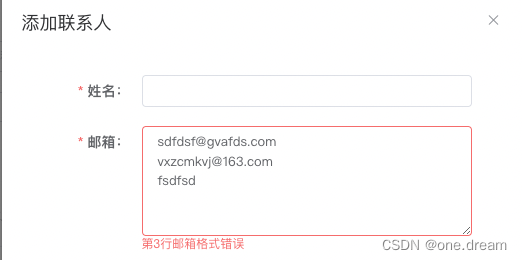
效果
在这里插入图片描述
代码 vue element

const validMail = (rule, value, callback) => {
      if (!value) {
        callback(new Error('请输入邮箱'));
      }
      value = value.replace(/[\n]/g, ',');
      const reg = RegExp(/^(?=.*\.)(?=.*@).*$/);
      if (!value.includes(',')) {
        if (!reg.test(value)) {
          callback(new Error('邮箱格式错误'));
        } else {
          callback();
        }
      } else {
        let flag = -1;
        value.split(',').map((mail, index) => {
          if (mail && !reg.test(mail)) {
            flag = index;
          }
        });
        if (flag !== -1) {
          callback(new Error(`第${flag + 1}行邮箱格式错误`));
        } else {
          callback();
        }
      }
    };

查看 brew.git 当前源

$ cd “$(brew –repo)” && git remote -v
origin https://github.com/Homebrew/brew.git (fetch)
origin https://github.com/Homebrew/brew.git (push)

查看 homebrew-core.git 当前源

$ cd “$(brew –repo homebrew/core)” && git remote -v
origin https://github.com/Homebrew/homebrew-core.git (fetch)
origin https://github.com/Homebrew/homebrew-core.git (push)

修改 brew.git 为阿里源

$ git -C “$(brew –repo)” remote set-url origin
https://mirrors.aliyun.com/homebrew/brew.git

修改 homebrew-core.git 为阿里源

$ git -C “$(brew –repo homebrew/core)” remote set-url origin
https://mirrors.aliyun.com/homebrew/homebrew-core.git

zsh 替换 brew bintray 镜像

$ echo ‘export
HOMEBREW_BOTTLE_DOMAIN=https://mirrors.aliyun.com/homebrew/homebrew-bottles’

~/.zshrc
$ source ~/.zshrc

bash 替换 brew bintray 镜像

$ echo ‘export
HOMEBREW_BOTTLE_DOMAIN=https://mirrors.aliyun.com/homebrew/homebrew-bottles’

~/.bash_profile
$ source ~/.bash_profile

刷新源

$ brew update

本质还是webpack

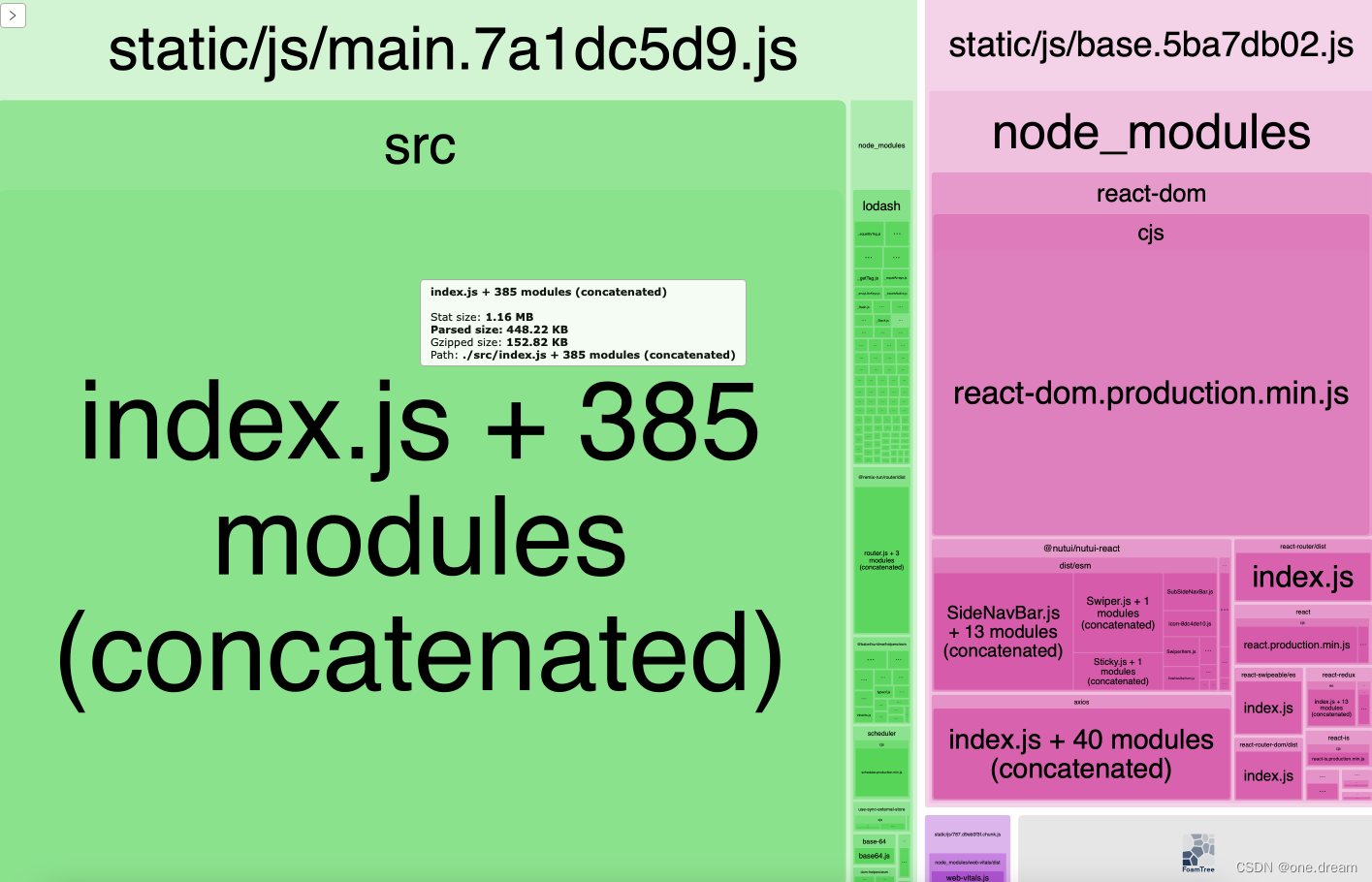
1.查看包体积

使用webpack-bundle-analyzer进行分析

const { BundleAnalyzerPlugin } = require('webpack-bundle-analyzer'); 
 new BundleAnalyzerPlugin({
        analyzerMode: 'server',
        analyzerHost: '127.0.0.1',
        analyzerPort: 8888,
        openAnalyzer: true, // 构建完打开浏览器
        reportFilename: path.resolve(__dirname, `analyzer/index.html`), 
    }),

在这里插入图片描述

2 使用splitChunks拆分代码

plugins:[],
configure: (webpackConfig, { env: webpackEnv, paths }) => {
            webpackConfig.optimization.splitChunks = {
                ...webpackConfig.optimization.splitChunks,
                cacheGroups: {
                    base: {
                        // 基本框架
                        chunks: 'all',
                        test: /(react|react-dom|react-dom-router|axios)/,
                        name: 'base',
                        priority: 100,
                    },
                    moment: {
                        test: /[\\/]node_modules[\\/]moment[\\/]/,
                        name: 'moment',
                        priority: 90,
                    },
                    // echarts: {
                    //     test: /(echarts)/,
                    //     name: 'echarts',
                    //     priority: 100,
                    // },
                    commons: {
                        chunks: 'all',
                        // 将两个以上的chunk所共享的模块打包至commons组。
                        minChunks: 2,
                        name: 'commons',
                        priority: 80,
                    },
                },
            };
            return webpackConfig;
        }

3.使用babel-plugin-import按需引入

 babel: {
    plugins: [
      // 配置 babel-plugin-import ant按需加载
      [
        'import',
        {
          libraryName: 'antd',
          libraryDirectory: 'es',
          style: 'true',
        },
        'antd',
      ],
      [
        'import',
        {
          libraryName: 'moment',
          libraryDirectory: 'es',
          style: 'true',
        },
        'moment',
      ],
    ],

使用图片懒加载 LazyLoadImage

yarn add react-lazy-load-image-component

css异步加载

css文件的加载是会block网站渲染的 因此我们可以把css异步加载 具体方法

<link href="73131f5.css" rel="stylesheet" media="jscourse" onload="this.media='all'" />

错误:Insecure completion-dependent directories detected
在vi ~/.zshrc头部添加 ZSH_DISABLE_COMPFIX=true 没用的情况下
解决方法
终端输入

compaudit | xargs chmod g-w,o-w /home/用户名称/.oh-my-zsh/custom/plugins/zsh-autosuggestions

在这里插入图片描述
解决

0%